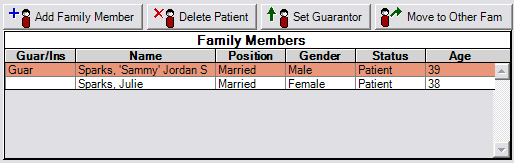
The guarantor is the family member responsible for the account. The guarantor does not necessarily need to be a patient, especially if the patient is a minor. The guarantor is always the first patient in the Family Members list. The row of the current patient is highlighted in red as shown above. The information showing in the rest of the Family module is for that patient. You can change the current patient by clicking on another family member on the list or by using the Select Patient button.
There are a number of ways to rearrange patients and move them between families using the four buttons above the list.
Add Family Member
You can only use this button if you already have a family loaded. If you need to create a new family, you do this by adding a family from within the Select Patient window. When you click the Add Family Member button, it will bring up the Edit Patient Information window. The first name will be blank, but much of the information will have been filled in, such as address and phone number. The address and phone number used will be based on the patient that was currently selected when you added the family member.
Delete Patient
You cannot delete the guarantor unless the guarantor is the only member in the family. Otherwise, you would need to make another family member the guarantor first. If you delete a patient, you will no longer be able to access that patient from any portion of the program. Even so, the patient does not actually get deleted, because the patient ID might have been used in different parts of the program, and actually deleting a patient might destabilize the program.
Set Guarantor
The guarantor of a family can be changed by clicking the Set Guarantor button. This makes the currently selected family member the guarantor.
Move to Another Family
If a patient must be moved from one family to another, you can select the patient you wish to move. Then, click the Move button. You will be given the option to create a new family instead of moving the patient to a different family. You can either do this or continue on to select an existing family. You cannot move the guarantor to another family unless there are no other family members. Moving the guarantor into another family effectively combines two families. The account notes for the families will be combined, as will the address/phone notes.